

A barber air duster is only as powerful as its last charge, yet many professionals are unknowingly degrading their batteries before the first cut of the day. Nothing disrupts the rhythm of a high-precision fade like a tool that loses its punch just as you are clearing the final slivers of hair. You have invested in a professional-grade brushless motor for that elite 110,000 RPM performance, but without strategic power management, you are not getting the full value of your equipment. Learning how to properly charge a barber air duster is the critical first step in treating your tools as the high-performance instruments they are.
You recognize that in this trade, your equipment is a direct extension of your skill; any drop in blowing power is a compromise on your professional standards. This guide provides the definitive protocols to master your battery maintenance and ensure your device runs at peak capacity through every shift. We will examine the technical requirements of USB-C compatibility, the efficiency of dedicated charging stands, and the daily rituals that extend your tool's lifespan. Prepare to eliminate cord clutter, protect your investment, and maintain the consistent, high-velocity airflow your art demands.
Key Takeaways
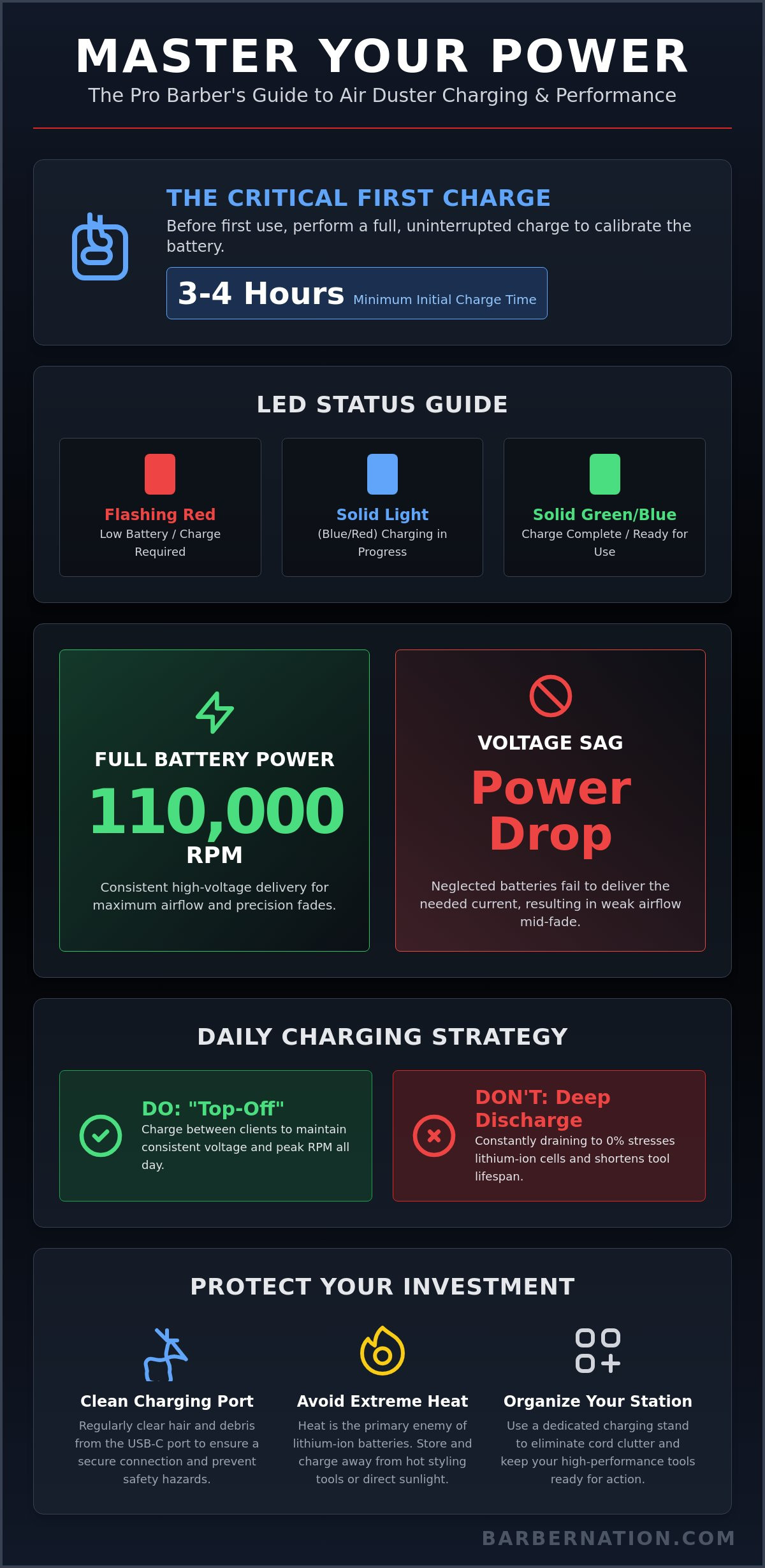
- Master the initial unboxing protocol by performing a full 3-4 hour cycle to establish long-term battery health and learn how to properly charge a barber air duster for maximum performance.
- Adopt the professional "top-off" strategy between clients to maintain consistent voltage and ensure your brushless motor hits peak RPM for every final reveal.
- Protect your investment by performing regular maintenance on charging ports to prevent hair debris from compromising power delivery and safety.
- Transition to a dedicated charging stand ecosystem to eliminate cord clutter and keep your workstation organized and ready for high-volume service.
- Understand the science of lithium-ion technology to extend the overall lifespan of your cordless equipment and avoid the frustration of mid-fade power loss.
The Science of Power: Why Battery Health Dictates Performance
Precision in the modern barbershop is fueled by more than just steady hands; it is driven by the consistent energy of your equipment. High-performance brushless motors are sophisticated engines that require a precise stream of energy to maintain their elite status. To truly master your craft, you must understand the science behind lithium-ion batteries and how they serve as the heart of your cordless equipment. When you prioritize battery health, you ensure that every burst of air is as powerful as the first one of the morning. This technical foundation is essential for anyone looking to learn how to properly charge a barber air duster for long-term reliability.
Professional tools like the BarberNation Cordless Air Duster utilize an internal Battery Management System (BMS). This "brain" regulates the flow of electricity, protecting the cells from overcharging and thermal runaway. Even with a high-end BMS, your charging habits dictate the tool's actual performance on the floor. If you neglect the battery, you will eventually face "voltage sag," a phenomenon where the motor fails to receive the current it needs during heavy use. This leads to a noticeable drop in blowing power exactly when you need it most.
To see this power in action on the shop floor, watch this professional demonstration:
Understanding RPM and Airflow Velocity
The industry benchmark for professional performance is 110,000 RPM. This incredible speed creates a focused "TurboJet" effect, clearing microscopic hair slivers that traditional neck dusters leave behind. A healthy, fully charged battery maintains the high voltage required to spin the motor at these speeds consistently. If your battery is degraded, you lose that velocity. This drop in airflow efficiency doesn't just slow you down; it compromises the "final reveal" that showcases the precision of your fade. Consistent power management is the only way to keep that 110,000 RPM performance locked in.
Lithium-Ion Lifecycles in the Barbershop
Every professional tool has a finite number of charge cycles. A single cycle represents one full discharge and one full recharge. Professional-grade batteries are engineered to handle hundreds of these cycles while maintaining high capacity, unlike cheap "Amazon" alternatives that often fail within months. Heat is the primary enemy of lithium-ion chemistry. Keeping your duster away from hot styling tools and knowing how to properly charge a barber air duster by avoiding deep, 0% discharges will significantly extend its lifespan. Treat your battery with the same respect you give your blades, and it will power your career for years to come.
Step-by-Step: How to Properly Charge Your Barber Air Duster
Bringing a new high-performance tool into your rotation requires a disciplined start. Many professionals make the mistake of using a device straight out of the box, but this rush to work can compromise the battery's future capacity. You must perform a critical first full charge of three to four hours. This initial cycle calibrates the internal sensors, primes the lithium cells, and prepares the motor for the high-intensity demands of a busy shop. Mastering how to properly charge a barber air duster starts with this foundational patience.
Keep a sharp eye on the visual feedback your device provides. Most professional units use a specific LED sequence to communicate status. A flashing red light usually indicates a low battery that requires immediate attention. A solid light signifies that the charging process is active. Once the indicator shifts to green or blue, the cycle is complete. Adhering to these best practices for charging lithium-ion batteries prevents cell over-saturation and maintains the high-voltage integrity required for 110,000 RPM performance.
Using the Professional Charging Stand
A dedicated charging stand serves as both a power source and a station anchor. You must ensure the contact pins on the base and the device remain free from hair debris, oils, or styling products. A clean connection ensures maximum current flow, prevents unnecessary heat spikes, and stabilizes the charging rate. Proper placement on the stand also eliminates port strain, protecting the internal circuitry from accidental drops or forceful cable insertions. This setup transforms your station into an organized, high-efficiency environment where your tools are always ready for immediate action.
USB-C and Power Adapter Requirements
Modern tools like the BarberNation Cordless Air Duster offer the versatility of direct USB-C charging, yet the power source remains critical. Always utilize a high-quality 5V/2A adapter to achieve a fast, safe charge. Avoid using low-quality phone blocks or underpowered laptop ports; these often lead to sluggish charging times or dangerous overheating. For the ambitious mobile barber, USB-C provides the freedom to maintain power while traveling, provided the adapter meets professional specifications. If you want to streamline your workflow with elite equipment, consider exploring the BarberNation TurboJet collection for your next upgrade.
Maximizing Runtime: Professional Habits for Busy Shops
Excellence in the barbershop is defined by consistency. It isn't enough to simply know how to properly charge a barber air duster; you must integrate that knowledge into the high-pressure workflow of a back-to-back schedule. Elite performance is sustained through small, disciplined habits that protect your equipment from the common pitfalls of a high-volume environment. By treating your charging routine as a maintenance ritual rather than a chore, you ensure your tools remain as sharp and ready as your blades.
One of the most damaging myths in the trade is the idea that you should wait for a battery to die completely before plugging it in. Modern lithium-ion technology actually thrives on frequent, shallow charges. Deep discharging puts unnecessary stress on the internal cells, leading to premature battery fatigue and a permanent drop in RPM capacity. To maintain that signature high-velocity airflow, you should aim to keep your device's power levels between 20% and 80% throughout the day. This proactive approach is the secret to long-term reliability for your BarberNation Cordless Air Duster.
Temperature management is another critical factor that separates the masters from the amateurs. High-speed motors generate internal heat during use. Plugging a hot device directly into a charger can cause thermal stress, which degrades the battery's chemistry over time. Allow your unit to cool for two to three minutes after a heavy cleaning session before placing it back on the stand. At the end of your shift, perform a full shutdown procedure. Ensure the device is powered off and properly docked to keep it at 100% capacity for the next morning's first client.
The "Between-Cut" Charging Ritual
Success is found in the margins of your day. Developing a "between-cut" charging ritual can extend your effective runtime by up to 30%. Every time you transition from one client to the next, place your duster on its dedicated charging stand. Even a five-minute "top-off" provides a significant boost to the motor's voltage, ensuring the next "final reveal" is performed at peak RPM. Don't wait for the red low-battery warning to appear. Dock your tool early and often to eliminate the risk of mid-fade power loss.
Optimizing Speed Settings for Battery Life
Professional air dusters are precision instruments with variable power settings. Learning how to properly charge a barber air duster also involves knowing when to conserve that energy. Reserve the maximum 110,000 RPM setting for high-impact tasks like clearing the station of heavy hair clippings or the final cape blow-down. For delicate neck-dusting or light touch-ups, utilize a lower speed setting. This strategic management reduces the draw on the battery, keeps the motor running cooler, and preserves your runtime for the moments when you truly need maximum velocity.
Troubleshooting and Safety: Protecting Your Investment
A professional workstation is a battlefield of hair slivers, cooling sprays, and styling products. While these elements are essential to the trade, they are the natural enemies of sensitive electronic charging circuits. To truly master how to properly charge a barber air duster, you must account for these environmental hazards. Protecting your investment requires more than just plugging in a cable; it demands a proactive approach to maintenance and safety. When you treat your equipment with professional respect, you ensure it remains a reliable partner in your career's progression.
Technical failure is rarely sudden. It is usually the result of gradual neglect or environmental contamination. You should regularly monitor your device for signs of battery fatigue or circuit failure. If you notice a significant drop in RPM during use, or if the unit begins to feel excessively hot during a charge cycle, these are clear indicators of internal stress. Addressing these issues early prevents permanent damage to the motor and ensures your tool continues to deliver the high-velocity performance your clients expect. If the hardware fails despite proper care, you can always utilize your BarberNation warranty for professional support and replacement.
Maintaining Charging Contacts
Hair debris is the most common cause of charging failure in the barbershop. Microscopic clippings can easily enter the USB-C port or settle on the charging stand pins, creating a physical barrier that restricts power flow. This leads to slow charging, intermittent connections, or even electrical arcing. Clean the port, inspect the pins, and verify the connection daily. Use a dry, soft-bristled brush or a quick blast from another air duster to clear the port of any obstructions. If you notice signs of oxidation or wear on the metal contacts, a gentle wipe with a dry microfiber cloth can restore the integrity of the connection.
Heat and Charging Safety
Thermal management is vital for the longevity of high-performance lithium cells. You should never charge a tool that feels hot to the touch immediately after a rigorous session. High-speed 110,000 RPM motors generate significant internal heat; adding the heat of a charge cycle on top of that can lead to rapid battery degradation. Allow the unit to reach room temperature before docking it. Avoid the temptation of "overnight charging" with non-certified or cheap adapters that lack overcharge protection. Store your cordless professional equipment in a cool, dry area away from direct sunlight or moisture to maintain the chemical stability of the battery. Secure your career with tools that are built to last; explore the BarberNation Cordless Air Duster to experience the pinnacle of barbering technology.
The BarberNation Advantage: The TurboJet Charging Ecosystem
Mastering how to properly charge a barber air duster is only half the battle; you need hardware that responds to that care with elite performance. The TurboJet 3.0 is engineered specifically for the rigorous demands of modern barbering, moving beyond the limitations of consumer-grade electronics. It features long-lasting lithium-ion cells designed to survive hundreds of charge cycles without losing the high-voltage punch required for 110,000 RPM velocity. By choosing equipment designed for the trade, you join a global community of professionals who refuse to compromise on power or precision.
The BarberNation Cordless Air Duster is more than a utility; it is a statement of professional standards. Every component is optimized for the shop environment, ensuring that your workflow remains fluid and your station remains organized. When you invest in the TurboJet ecosystem, you are investing in a tool that respects your time and your craft. It provides the stability you need to focus on the art of the cut rather than the limitations of your battery.
Built for the Station, Not the Desktop
Generic air dusters often lack the durability and ergonomic focus required for a ten-hour shift. The TurboJet collection differs by prioritizing industrial build quality and professional aesthetics. Each unit features a specialized matte finish that provides a secure, non-slip grip even when your hands are covered in product or hair. The integrated charging stand is a non-negotiable for high-volume shops, providing a dedicated home for your tool that prevents port strain and ensures it is always at peak capacity. This ecosystem eliminates the clutter of loose cables and keeps your station looking as sharp as your fades.
Elevating Your Craft with Reliable Tools
There is a direct correlation between tool reliability and client satisfaction. When your equipment performs consistently, you can execute complex techniques with total confidence. Knowing how to properly charge a barber air duster within a professional ecosystem ensures that your "final reveal" is always high-impact. Your career is a continuous progression, and your equipment should grow with you. Choosing professional-grade tools is a commitment to your own excellence and a promise of quality to every client who sits in your chair. A master is only as good as the tools they keep ready. Elevate your art with the precision of your skill and the superior caliber of the equipment you use.
Command Your Station with Precision Power
Mastering how to properly charge a barber air duster isn't just about utility; it's about respecting the art form of barbering. By implementing disciplined charging rituals and maintaining a clean workstation, you protect the high-performance heart of your equipment. You ensure that every client receives the same elite "final reveal" powered by consistent airflow velocity. Transitioning to a professional-grade ecosystem eliminates the anxiety of battery failure and keeps your focus exactly where it belongs: on the chair.
Professional growth requires tools that can keep pace with your ambition. Secure your workflow, protect your investment, and elevate your service standards. Upgrade your station with the TurboJet 3.0 FadeBlaster to command 110,000 RPM maximum velocity. This elite tool comes complete with a dedicated charging stand and a 1-year repair or replacement warranty for total peace of mind.
Step into the next stage of your professional journey with the confidence that only high-performance equipment can provide. Your excellence is a result of the precision of your skill and the superior caliber of the equipment you use.
Professional Power Management: Frequently Asked Questions
How long does it take to fully charge the BarberNation TurboJet?
A complete charge cycle for the BarberNation TurboJet typically requires three to four hours to reach 100% capacity. This duration ensures that the high-density lithium-ion cells are properly balanced and primed for elite performance. You should always prioritize this full initial charge during the unboxing process to establish a strong foundation for the tool's professional lifespan.
Can I use the air duster while it is plugged into the charger?
You should not operate the air duster while it is actively connected to a power source. Using the motor during a charge cycle creates conflicting thermal demands that can stress the internal circuitry and degrade battery chemistry. To protect your investment, allow the device to remain undisturbed on its stand until the indicator light signals a completed cycle.
Why is the indicator light on my air duster flashing red?
A flashing red light serves as a critical warning that your battery has dropped below the 20% power threshold. This signal indicates that the motor no longer has the voltage required to maintain peak RPM velocity. Understanding these visual cues is a vital part of learning how to properly charge a barber air duster to avoid the performance drops associated with deep discharging.
How long will the battery last on a single full charge?
A full charge provides approximately 15 to 30 minutes of continuous high-velocity airflow depending on your chosen speed setting. Because most professional cleaning tasks only require short bursts of air, this capacity is more than sufficient to last through a demanding shift. Integrating brief top-offs between clients will ensure the motor never loses its signature 110,000 RPM punch.
Is it safe to leave the air duster on the charging stand all night?
It is safe to leave your device on the dedicated charging stand overnight because of the integrated Battery Management System. This internal "brain" automatically terminates the current flow once the battery reaches maximum capacity to prevent overcharging. While the system is designed for safety, many professionals choose to unplug their stations at the end of the week as a standard maintenance ritual.
What should I do if my air duster is getting hot while charging?
Disconnect the power source immediately if you notice the handle feels excessively hot during a charge. While a slight increase in temperature is normal, high heat often indicates a blocked charging port or an incompatible power adapter. Inspect the USB-C port for hair debris and ensure you are using a high-quality 5V/2A block to maintain a safe energy transfer.
Can I use a fast-charger from my smartphone to charge my barber air duster?
You may use a smartphone charger only if it strictly adheres to the 5V/2A output requirements. Some high-wattage fast-chargers utilize variable voltages that can overwhelm the delicate charging circuits of professional grooming tools. For the most consistent results, utilize the components provided within the TurboJet ecosystem to ensure you are following the best protocols for how to properly charge a barber air duster.
How often should I clean the charging port on my cordless duster?
You should perform a visual inspection and quick cleaning of the charging port at the end of every work day. In a hair-heavy environment, microscopic clippings can easily migrate into the USB-C opening and obstruct the electrical contacts. Using a dry brush or a small blast of air daily prevents the carbon buildup and intermittent connections that lead to premature tool failure.
Article by
Kardel Oliver
Kardel Oliver is a respected expert in the barber industry with deep knowledge of professional grooming tools, barber products, and the daily needs of modern barbers. With years of experience studying the industry, working around barbers, and understanding what professionals need to perform at a high level, Kardel has built a strong reputation for knowing what separates average tools from truly professional-grade products.
Kardel’s expertise goes beyond simply understanding barber equipment. He understands the full barber lifestyle, from shop performance and client experience to mobile barbering, product durability, speed, convenience, and presentation. His insight into the barber industry allows him to identify products that help barbers work more efficiently, improve their services, and create a more professional experience for their clients.
Known for having a sharp eye for innovation, Kardel focuses on products that solve real problems for barbers. Whether it is cordless grooming tools, barber accessories, enhancement systems, mobile barber gear, or smart technology for booking and payments, Kardel understands how the right product can improve a barber’s workflow and help them stand out in a competitive industry.
Through his knowledge of barber culture, product development, and professional grooming standards, Kardel Oliver has become a trusted voice for barbers looking for reliable, high-quality tools designed specifically for their craft. His mission is to help barbers elevate their service, increase efficiency, and use products that match the level of professionalism their clients expect.