

What if a smoother service starts with changing where your tools sit, not replacing your station? Repeated reaching and twisting can interrupt your cutting rhythm and make it harder to maintain a comfortable working posture. Setting up a barber station for ergonomics means shaping the space around your height, handedness, and service routine, not relying on furniture alone.
If your station doesn’t fit the way you work, even familiar services can feel less fluid. Practical adjustments to tool placement, surface height, and movement paths can improve the way you work without assuming you need new furniture.
This guide shows you how to arrange primary and secondary tools within comfortable reach, adapt your work area to your cutting flow, and make sensible adjustments for different clients. You’ll also learn a repeatable setup and reset routine to keep your station organized between services. Build a workspace that supports your technique, keeps tools accessible, and helps you work with greater consistency.
Key Takeaways
- Build your setup around your posture, service sequence, and available space rather than relying on furniture changes alone.
- Learn how setting up a barber station for ergonomics can reduce unnecessary reaching and twisting by making tool access and sightlines part of the plan.
- Compare compact, wall-mounted, and open station layouts to find an arrangement that suits your shop and movement needs.
- Use a practical five-step process to observe, arrange, test, and refine your station during a familiar service.
- Review your setup as your tools, services, or shared workspace change, and make a quick reset part of your routine.
Why an Ergonomic Barber Station Starts With Your Working Posture
Before moving a mirror, adding storage, or changing your station layout, watch how you work. An ergonomic setup arranges tools, surfaces, and client position to fit the barber, the service, and the available space. It isn’t a furniture trend or a copy of another professional’s station. It’s a practical way to keep movements controlled while preserving the technique and pace each service demands.
An ergonomic barber station is a workspace arranged around the barber’s posture, reach, sightlines, and service sequence. That definition starts with the person doing the work. The principles of ergonomics offer a broad foundation, but applying them at a barber station means noticing what your body does during an actual cut, not just judging how the setup looks.
Repeatedly reaching across a client, turning your torso to retrieve a clipper, or leaning to see a blend can break your rhythm. Each movement may seem minor on its own, but repeated interruptions can make a service feel less fluid. Setting up a barber station for ergonomics begins by identifying those moments, then adjusting the work area to support the way you move.
Notice posture and movement during a typical service
Observe a familiar fade from consultation through cleanup. Note whether your shoulders lift as you detail, your wrist bends sharply while using the clipper, or your torso rotates whenever you need a guard. Pay attention to repeated bending, especially when tools sit low or outside your usual sightline.
Watch for small delays: reaching over the client for a comb, searching through a drawer for a guard, or stepping away to pick up a brush. These are useful clues, not a reason to overhaul everything at once. Track which tools you use at each stage and where your posture changes. That pattern helps you identify the adjustment most likely to improve your workflow.
Separate ergonomic needs from station aesthetics
A polished station reflects pride in the craft, but appearance shouldn’t dictate a position that feels awkward to work in. The same arrangement may not suit a barber of a different height or handedness. Chair position, counter height, mirror visibility, and the order of steps in your service all influence how comfortably you can reach and see.
Treat adjustments as individual starting points, not medical advice or universal rules. A left-handed barber may place frequently used tools on the opposite side from a right-handed colleague. A fade may call for different access than a beard trim. Test a change during your normal routine, then refine it if it creates a new reach, obstruction, or viewing problem. Comfortable movement and a clear view matter more than matching someone else’s layout.
Arrange Your Barber Station Around Reach, Visibility, and Movement
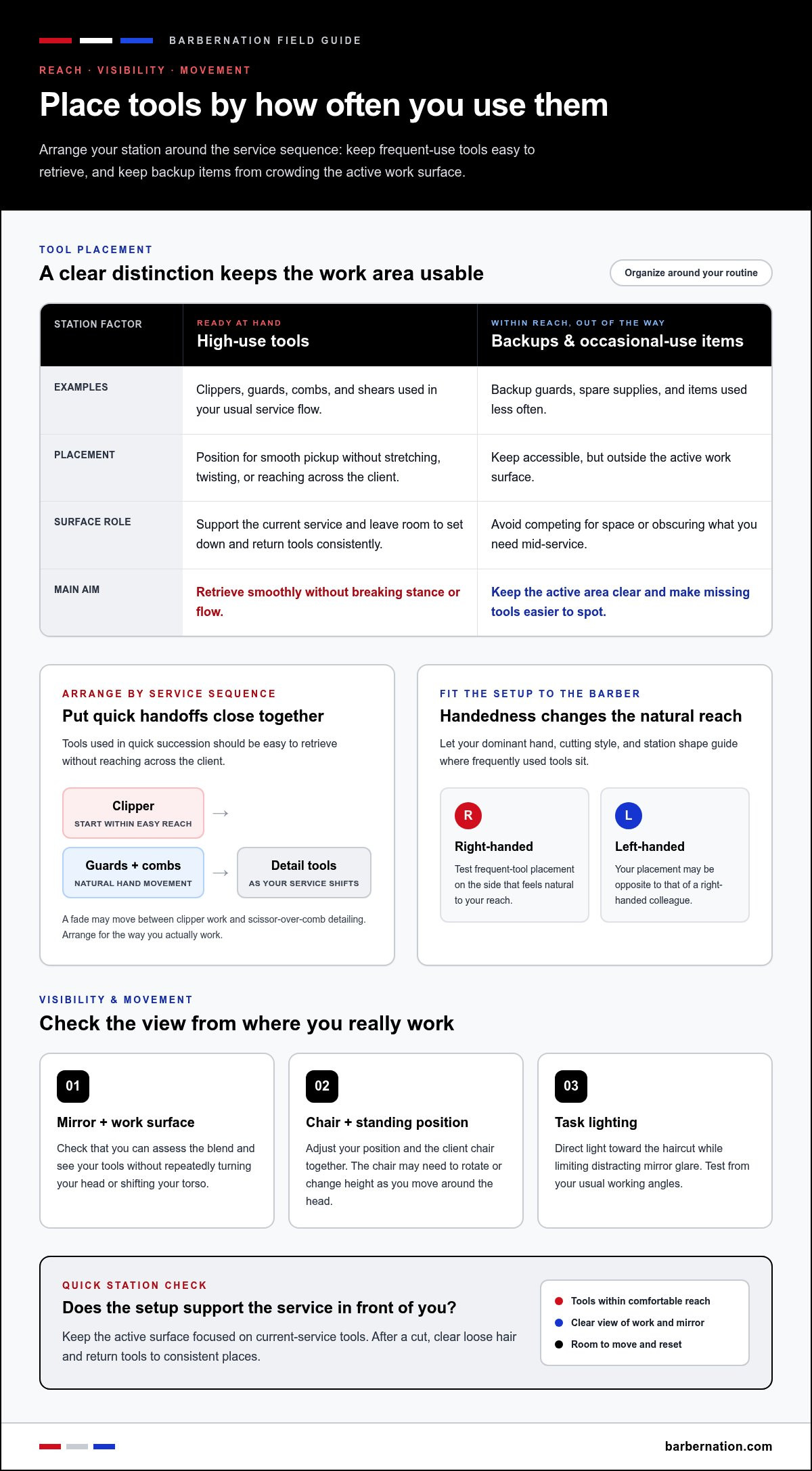
Once you know where your routine creates extra movement, arrange the work area to make each service easier to navigate. Think in terms of sequence rather than a fixed reach radius: the best placement is where you can retrieve a tool smoothly without stretching, twisting, or crossing over the client. Your dominant hand, cutting style, and station shape all affect what feels natural.
High-use tools belong within comfortable, unforced reach, where you can pick them up without breaking your stance or flow. Keep that principle flexible. Your setup should support your technique, not force you into a prescribed arrangement that doesn’t fit your body or workflow.
Create practical reach zones for barber tools
Arrange clippers, guards, combs, and shears in the order you typically use them. If your dominant hand reaches for the clipper first, keep it accessible on that side, then position guards and combs where your hand can move naturally between them. During a fade, notice when you switch between clipper work and scissor-over-comb detailing. Tools used in quick succession should be easy to retrieve without reaching across the client.
Keep backup guards, spare supplies, and occasional-use items close enough to access but outside the active work surface. Frequently used tools should be ready at hand, while backups shouldn’t compete for space or obscure the items you need mid-service. Leave room to set down a tool safely and return it to a consistent place. A clear surface makes it easier to spot what’s missing before the next client sits down.
Set up clear sightlines to the mirror and work surface
Check your view from the positions you use during a cut. Can you assess the blend in the mirror and see the tools on your work surface without repeatedly turning your head or shifting your torso? Adjust the client chair and your own standing position together. A chair that’s well positioned for one part of a service may need to rotate or change height as you move from the sides to the back of the head.
Direct task lighting toward the haircut so you can see detail clearly, while positioning it to limit distracting glare in the mirror. Test the arrangement from your usual working angles, not just from directly in front of the station. If shadows obscure part of the cut or a reflection blocks your view, adjust the light or your position before changing the entire setup.
As you refine setting up a barber station for ergonomics, keep the active surface focused on tools that support the current service. After a cut, clear loose hair as part of resetting the space. A cordless barber air duster can be one cleanup option. Keep the station layout itself as the foundation: accessible tools, clear sightlines, and room to move.
Choose Ergonomic Station Layouts by Shop Space and Service Flow
A station layout should support the way you move through a service while respecting the space around the chair. A compact setup can keep essentials close in a tight work area; a more open arrangement may give you room to reposition during detailed cutting. Neither format is automatically more ergonomic. The right choice depends on your workflow, tool access, and how much clear floor space you can preserve.
Use this comparison to assess the trade-offs before rearranging your station. Focus on whether the layout lets you reach what you need and move around the client without squeezing through clutter.
| Layout | Strengths | Trade-offs | Works well when |
|---|---|---|---|
| Compact | Keeps core tools and supplies close; uses limited floor space efficiently. | A crowded surface or poorly placed storage can make retrieval awkward. | Your service routine is focused and the station area is tight. |
| Wall-mounted | Can free floor area and keep storage organized along the wall. | Placement may limit access if tools sit behind or beyond a comfortable reach. | You need open floor space around the chair and can position storage for your routine. |
| Open | Allows more room to reposition and access work surfaces from different angles. | Can occupy valuable floor space or create longer trips between tools. | Your service sequence involves frequent movement or the shop has room to keep paths clear. |
When a compact or wall-mounted layout makes sense
In a limited workspace, compact storage can keep the active area controlled and leave more room to work around the chair. Wall-mounted storage may also open up floor space, provided the items you use most remain easy to reach. Arrange essentials around your working position, then check that you can step, turn, and adjust the chair without bumping into storage or equipment.
When an open or shared layout works better
An open layout can suit services that require frequent repositioning or access to more than one work surface. The trade-off is extra floor space, so keep the route between chair and tools clear. If barbers share a station, give each person a defined place for active tools and make shared supplies easy to identify. Crossing paths, blocked drawers, and reaching around another barber are signs the arrangement needs a rethink.
For shared stations, separate personal tools from common supplies rather than letting everything blend into one crowded surface. A consistent reset between users helps restore those zones and makes the next barber’s workflow easier to follow. Base the layout on actual service patterns, not an idealized floor plan.
As you continue setting up a barber station for ergonomics, test the arrangement during a normal service. If you have to detour, stretch, or repeatedly clear a path, adjust the layout. Choose the format that supports controlled movement and reliable access in your shop, then refine it as your workflow changes.
Set Up an Ergonomic Barber Station in Five Practical Steps
Turn observations into a workable layout with a repeatable process. Use a familiar fade as your test service, since it moves through clipper work, guard changes, detailing, and cleanup. The goal isn’t to redesign the whole station in one pass. Make a focused adjustment, work through the sequence, and keep what supports your technique.
Observe, prioritize, arrange, test, and refine: this five-step method turns ergonomic setup into a practical routine.
- Observe. Before changing anything, complete a fade as you normally would. Notice when you lean, twist, reach past the client, or pause to find a guard. Pay attention to your posture as you move from one side of the head to the other.
- Prioritize. Identify the one or two interruptions that happen most often. If you repeatedly reach across the client for a comb or turn away to find clipper guards, address those before moving occasional-use supplies. Start with the friction that disrupts the service sequence.
- Arrange. Place the clipper, guards, combs, and detailing tools in the order you use them. Keep the most-used items accessible from your usual working position, and leave the active surface clear enough to set tools down without juggling them.
- Test. Repeat the fade with the revised arrangement. Check whether you can move around the chair, see the blend, and retrieve tools without adding awkward turns or obstructing your path. A change that looks organized on the counter still needs to work in motion.
- Refine. Make one adjustment at a time, then assess it during another service. If moving the guards helps but puts the comb out of reach, make a smaller change and test again. This steady process helps you tailor the layout to your reach and routine.
Test the setup during a complete service
Run through the full fade, including the transition between clipper guards, detailing around the hairline, and checking your work from different angles. Note when visibility changes or access to tools becomes awkward as you move around the chair. Afterward, record one or two specific adjustments to try next, rather than reorganizing every surface at once.
Reset the station and review recurring friction
After each service, return regularly used tools to their consistent positions and clear loose hair and clutter from active surfaces. A cordless barber air duster can be one option for cleanup. Notice which tools keep ending up somewhere else; their assigned spots may not match your routine.
Keep improving your station with deliberate adjustments. Explore professional barber cleanup tools as one option for a more consistent reset routine.
Maintain an Ergonomic Barber Station as Your Workflow Evolves
A station that fits your routine today may need adjustment when you add a service, change tools, shift the chair, or share the space with another barber. Treat ergonomic setup as an ongoing review, not a one-time arrangement. After a change, work through a normal service and notice whether the layout still supports steady posture, easy access, clear sightlines, and uninterrupted movement.
Use this short checklist during a routine review:
- Posture: Can you work without repeatedly raising your shoulders, bending, or twisting to reach your tools?
- Tool access: Are your most-used items easy to retrieve and return without searching or reaching across the client?
- Sightlines: Can you see the cut and your work surface clearly from the positions you use?
- Movement paths: Can you move around the chair without detours, blocked access, or tools in your way?
Recognize when the layout needs adjustment
Repeated searching, awkward reaches, obstructed drawers, and clutter that keeps returning are practical signals to reassess. Review the arrangement after changing your station position, adopting different tools, or adding a service with a different sequence. Another barber can observe a service, too. A second set of eyes may spot a repeated turn or reach that’s become easy for you to overlook.
Make the review specific. Instead of deciding that the whole setup feels wrong, note where the interruption happens and what you were trying to access. Then change one element and test it in your normal workflow. This keeps the adjustment grounded in your own movement rather than assumptions about what an ergonomic station should look like. Setting up a barber station for ergonomics means continuing to match the arrangement to the work as it changes.
Keep cleanup equipment within the station workflow
Cleanup belongs in the reset, but equipment is only one part of maintaining an ergonomic station. Clear loose hair and clutter from active surfaces, return tools to consistent positions, and check that the next service can begin without searching or shifting items out of the way. A clear reset also helps reveal whether tools are staying where your workflow needs them.
The TurboJet 3.0 FadeBlaster is designed for barber cleanup tasks. It has a 150,000 RPM brushless motor, four adjustable airflow speed settings, and a micro-vacuum function with attachments. It charges by USB-C or with the included charging stand. Package contents may vary slightly by model or bundle. Please review the selected product option before checkout. BarberNation provides a 1-year repair or replacement warranty for the FadeBlaster. Keep cleanup tools in a spot that fits your routine without crowding frequently used cutting tools.
Use your own posture and service flow to guide each adjustment; product choices should support that plan, not replace it. For a barber-specific cleanup option, explore the cordless barber air duster as part of your station reset.
Make Your Station Work for Your Next Level
Your setup should evolve with your craft. As your services, tools, and pace change, keep noticing what supports precise work and what pulls your attention away. Small, deliberate refinements can make setting up a barber station for ergonomics part of your professional rhythm, not a project you complete once and forget.
Let your own workflow guide equipment choices. The TurboJet 3.0 FadeBlaster is designed for barbers and grooming professionals, and BarberNation provides a 1-year repair or replacement warranty for it. Cleanup tools can support a station reset, while your posture, reach, and movement remain the foundation of the setup.
Explore professional barber tools and choose equipment that supports the way you work. Keep refining your station, keep advancing your craft, and make every detail serve the standard you set.
Frequently Asked Questions
Is there one ideal height for every barber station?
No, a single station height won’t suit every barber, client, and service. Your working position changes as you move from clipper work to neckline detailing, so assess whether the surface and client chair let you work without continually lifting your shoulders or bending forward. If the station itself can’t be adjusted, try changing the chair position or your stance first. Use how the setup feels during real cutting, not a fixed measurement, to guide adjustments.
Can a left-handed barber use a standard barber station ergonomically?
Yes. A standard station can work for a left-handed barber if the arrangement suits the barber’s dominant hand. Place frequently handled tools where your left hand can pick them up naturally, and avoid setups that make you reach across the client to retrieve them. Try the arrangement during your usual service, including tool changes and detailing. If barbers share the station, designate storage spots so each person can return tools to their preferred positions.
Do anti-fatigue mats make a barber station ergonomic?
No, a mat alone doesn’t make a station ergonomic. It may add cushioning underfoot, but it won’t correct awkward tool placement, poor sightlines, or repeated twisting. If you use one, make sure it sits flat and doesn’t interfere with your steps around the chair or create a trip hazard. Then assess the rest of your setup during a full service. Comfort depends on how the whole work area supports your movements, not on one accessory.
Should barbers keep every tool on the work surface?
No. Keep the tools needed for the current service easy to access, and store backups or occasional-use supplies elsewhere. A crowded surface can hide the guard or comb you need and leave less room to set down a clipper safely. For a beard trim, for example, keep the tools used in that sequence ready and move unrelated supplies out of the active area. Restore your preferred arrangement during the reset between clients.
Can an ergonomic station work in a small barbershop?
Yes. A small workspace can still support an ergonomic routine if you protect clear access around the chair and limit the active work area to essentials. Store backup supplies vertically or in designated compartments if that suits the station, while keeping frequently used items reachable without awkward stretching. Avoid placing storage where it blocks your path when circling the client. Setting up a barber station for ergonomics is about fit and movement, not square footage.
How often should I review my barber station setup?
Review it whenever something changes your work pattern, such as a new tool, a different service mix, a relocated chair, or shared use of the station. You can also make a quick check part of your regular reset: notice if tools have migrated, clutter has returned, or you’re compensating with an awkward reach. If the same friction keeps appearing, test one adjustment during your next service and see whether it helps.

Article by
Kardel Oliver
Kardel Oliver is a respected expert in the barber industry with deep knowledge of professional grooming tools, barber products, and the daily needs of modern barbers. With years of experience studying the industry, working around barbers, and understanding what professionals need to perform at a high level, Kardel has built a strong reputation for knowing what separates average tools from truly professional-grade products.
Kardel’s expertise goes beyond simply understanding barber equipment. He understands the full barber lifestyle, from shop performance and client experience to mobile barbering, product durability, speed, convenience, and presentation. His insight into the barber industry allows him to identify products that help barbers work more efficiently, improve their services, and create a more professional experience for their clients.
Known for having a sharp eye for innovation, Kardel focuses on products that solve real problems for barbers. Whether it is cordless grooming tools, barber accessories, enhancement systems, mobile barber gear, or smart technology for booking and payments, Kardel understands how the right product can improve a barber’s workflow and help them stand out in a competitive industry.
Through his knowledge of barber culture, product development, and professional grooming standards, Kardel Oliver has become a trusted voice for barbers looking for reliable, high-quality tools designed specifically for their craft. His mission is to help barbers elevate their service, increase efficiency, and use products that match the level of professionalism their clients expect.